
The Anchorage
Personal website of Gregory K. Maxey, Commander USN (Retired)
The Anchorage
Personal website of Gregory K. Maxey, Commander USN (Retired)
The information, illustrations and code contained in my "Microsoft Word Tips" are provided free and without risk or obligation.

However, the work is mine. If you use it for commercial purposes or benefit from my efforts through income earned or time saved then a donation, however small, will help to ensure the continued availability of this resource.
If you would like to donate, please use the appropriate donate button to access PayPal. Thank you!



This Microsoft Word Tips & Microsoft Word Help page provides a VBA solution and alternative method to sort table contents.
Sorting a list of items when each item constitutes complete paragraph range in Microsoft Word is simplicity itself.
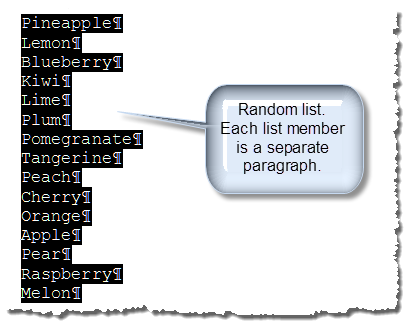
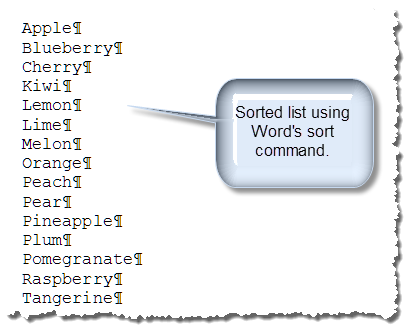
For example, the list of fresh fruits on the left below is unsorted. You can easily sort this list, as shown on the right, by selecting the entire list including the last paragraph mark and applying Words "Sort" command (Word 2003 Table>Sort – Word 2007/2010 Home>Paragraph>Sort.
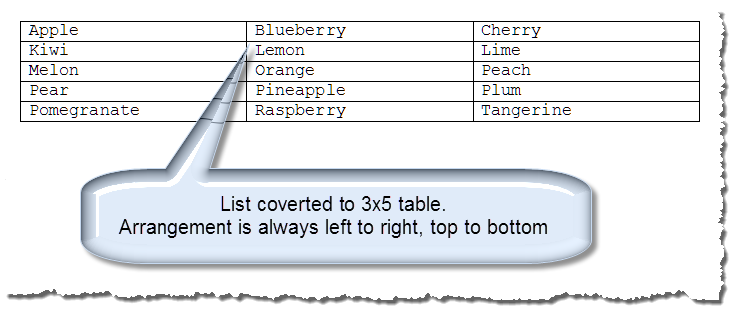
If you put that list in a multi-column table by selecting the text and applying Word's "Convert to Text" command (Word 2003 Table>Convert To Text – Word 2007/2010 Insert>Table>Convert To Text), the result is always sorted left to right/top to bottom as shown below:
This Microsoft Word Help & Microsoft Word Tips page shows you how to re-sort table contents top to bottom/left to right.
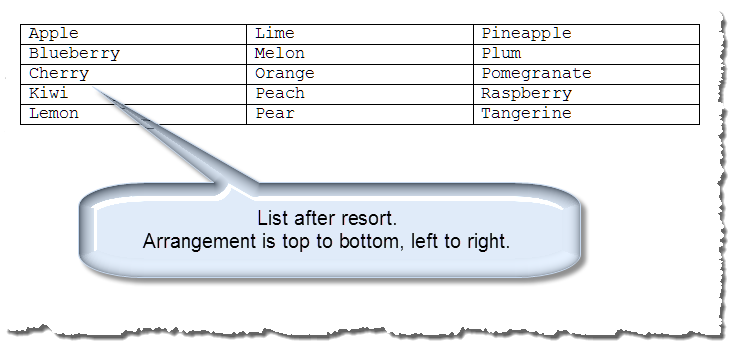
The process is performed by a simple VBA procedure. The contents of the table are placed in a one dimensional array, the array is sorted and the contents of the array are written back to the table top to bottom, left to right.
Option Explicit
Dim m_oTbl As Word.Table

Sub SortTable()
  'Set the table object = the table with the selection
  On Error GoTo Err_Handler:
  Set m_oTbl = Selection.Tables(1)
  'Table must be uniform (not split or merged cells)
  If Not m_oTbl.Uniform Then
    MsgBox "The selected table has split or merge cells and cannot be sorted with this procedure", vbInformation + vbOKOnly, "Non-Uniform Table"
    Exit Sub
  End If
  TableSort_Re_Sort
  Exit Sub
Err_Handler:
  MsgBox "Select a table an try again.", vbInformation + vbOKCancel, "Table Not Selected"
End Sub

Sub TableSort_Re_Sort(Optional bTopToBottom As Boolean = True)
Dim oCell As Cell
Dim arrData() As String
Dim i As Long, j As Long, k As Long

  'Initialize the array with no elements
  ReDim arrData(i)
  'Load the array with data in table.  Skip loading empty cells
  For Each oCell In m_oTbl.Range.Cells
    If Left(oCell.Range, Len(oCell.Range) - 2) <> "" Then
      ReDim Preserve arrData(i)
      arrData(i) = Left(oCell.Range, Len(oCell.Range) - 2)
      i = i + 1
    End If
  Next
  'Sort the array
  WordBasic.SortArray arrData
  'Delete content of table
  m_oTbl.Range.Delete
  'Reset counter
  i = 0
  'Fill table with sorted results
  If bTopToBottom Then
    For k = 1 To m_oTbl.Columns.Count
      For j = 1 To m_oTbl.Rows.Count
        m_oTbl.Cell(j, k).Range.Text = arrData(i)
        'Get out when lasted array element has been inserted in table
        If i < UBound(arrData) Then
          i = i + 1
        Else
         GoTo lbl_Exit
        End If
      Next
    Next
  Else
    For Each oCell In m_oTbl.Range.Cells
      oCell.Range = arrData(i)
      'Get out when lasted array element has been inserted in table
      If i < UBound(arrData) Then
        i = i + 1
      Else
        GoTo lbl_Exit
      End If
    Next
  End If
lbl_Exit:
  Exit Sub
End Sub
With a simple change to the SortTable procedure you can re-sort the table contents in the traditional left to right/top to bottom format.
 See: Installing Macros for instructions on how to set up and use the macros provided in this Microsoft Word Help & Microsoft Word Tips page.
I've adapted the two procedures shown above into template add-in you can down load here: Table Re-sort. The add-in provides the simple userform UI that you can use to sort or re-sort table contents.
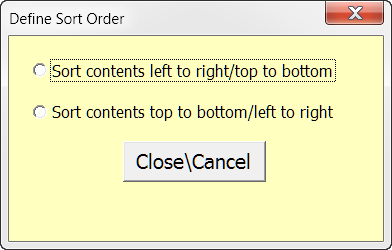
The form is initiated using a custom menu control I added to the Word 2003 Table menu. If the template is used in Word 2007/2010 the control propagates to the Word 2007/2010 Add-Ins tab "Custom Menus" group.
Note: This tips page, illustrations and examples were developed using Word 2003. It is wholly functional with Word 2007/2010. In Word 2007/2010 the menu control mention above is propagated on the Ribbon Add-Ins tab.
That's it! I hope you have found this tips page useful and informative.
The information, illustrations and code contained in my "Microsoft Word Tips" are provided free and without risk or obligation.
However, the work is mine. If you use it for commercial purposes or benefit from my efforts through income earned or time saved then a donation, however small, will help to ensure the continued availability of this resource.
If you would like to donate, please use the appropriate donate button to access PayPal. Thank you!
This page was last updated on
March 09, 2021
Website
Privacy Statement
Back to top  Back to
Word Tips
Back to
Word Tips