The Anchorage
Personal website of Gregory K. Maxey, Commander USN (Retired)
The Anchorage
Personal website of Gregory K. Maxey, Commander USN (Retired)
The information, illustrations and code contained in my "Microsoft Word Tips" are provided free and without risk or obligation.

However, the work is mine. If you use it for commercial purposes or benefit from my efforts through income earned or time saved then a donation, however small, will help to ensure the continued availability of this resource.
If you would like to donate, please use the appropriate donate button to access PayPal. Thank you!



The purpose of this Microsoft Word Tips & Microsoft Word Help page is is to introduce and publish "Cleanup Text."
A Word template add-in, "Clean Up Text" offers a friendly user interface to help you remove unwanted leading and trailing characters in text pasted from the web or unwanted document formatting. You can apply your cleanup options to the selected text, the current text story, or the whole document..
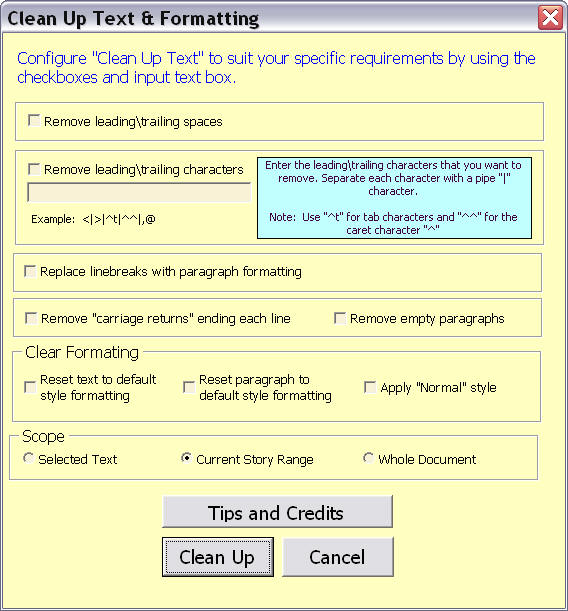
With the configuration shown above and a press of a button "Clean Up Text" will quickly convert a mess like this:
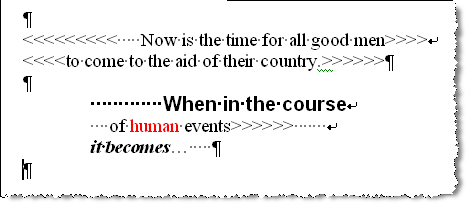
To text cleaned of your selected leading or trailing characters, free of unwanted direct and paragraph formatting like this:

The options in the "Clear Formatting" section replicates the manual method for clearing formatting:
Download the add-In here: Cleanup Text.
 For more on template add-ins and how to load them, see: Organizing Your Macros/Template Add-ins at: Installing Macros
That's it! I hope you have found this tips page useful and informative.
The information, illustrations and code contained in my "Microsoft Word Tips" are provided free and without risk or obligation.
However, the work is mine. If you use it for commercial purposes or benefit from my efforts through income earned or time saved then a donation, however small, will help to ensure the continued availability of this resource.
If you would like to donate, please use the appropriate donate button to access PayPal. Thank you!
This page was last updated on
March 09, 2021
Website
Privacy Statement
Back to top  Back to
Word Tips
Back to
Word Tips