
The Anchorage
Personal website of Gregory K. Maxey, Commander USN (Retired)
The Anchorage
Personal website of Gregory K. Maxey, Commander USN (Retired)
The information, illustrations and code contained in my "Microsoft Word Tips" are provided free and without risk or obligation.

However, the work is mine. If you use it for commercial purposes or benefit from my efforts through income earned or time saved then a donation, however small, will help to ensure the continued availability of this resource.
If you would like to donate, please use the appropriate donate button to access PayPal. Thank you!



The purpose of this Microsoft Word Tips & Microsoft Word Help page is to introduce and publish "Date Sequencer." Date Sequencer, now with a time span calculator, is intended as a manually loaded Word add-In. It provides a user interface for inserting a current, past, or future date and extended date sequence entries in Word documents.
The time span calculator will display the time span between two anchored date values with a choice of two formats.
You can use "Date Sequencer" to insert the current date, a "picked" date from a custom Date Picker control, roll up/back (i.e., future or past) dates, and user defined date sequences.
 Note: "Date Sequencer" was
originally created using Word 2003. In December 2020 the original .dot file
format with toolbars was converted to .dotm file format with associated ribbon
controls and the original calendar control replaced with a custom Date Picker
control. The original .dot format file is still available in the zipped
download file package. However, as the original calendar control is no
longer included in the Windows controls set, it may not function with newer
operating systems. .
Note: "Date Sequencer" was
originally created using Word 2003. In December 2020 the original .dot file
format with toolbars was converted to .dotm file format with associated ribbon
controls and the original calendar control replaced with a custom Date Picker
control. The original .dot format file is still available in the zipped
download file package. However, as the original calendar control is no
longer included in the Windows controls set, it may not function with newer
operating systems. .
User interface with "Date Sequencer" is through an easy to use controls group on the Ribbon Add-Ins tab and a custom userform "Control Panel."
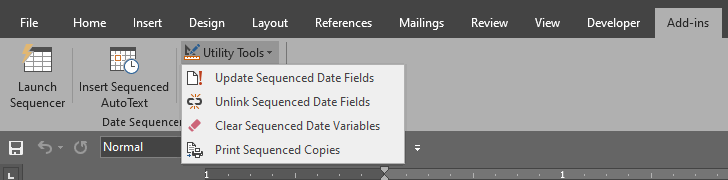
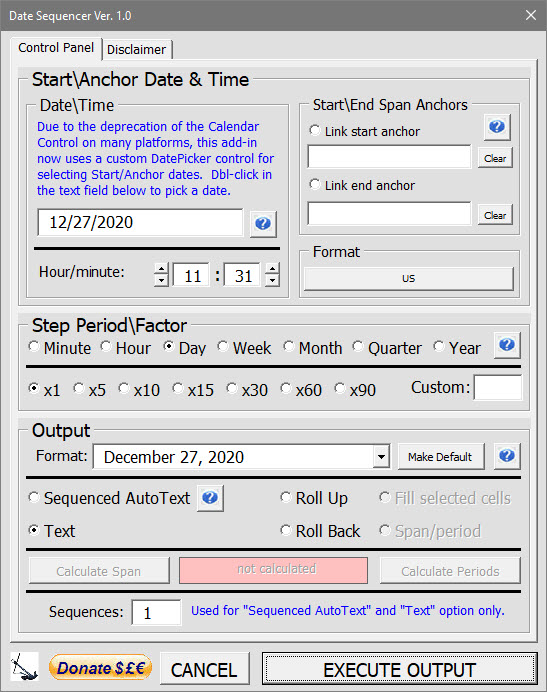
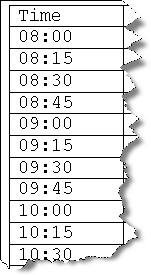
Most features are fully explained using the Help command button controls. The "Fill Selected Cells" output option can be used to fill a selection of cells in a Word table with a sequenced output. In the examples below, the cells in a selected table row has been filled with the sequenced days of the week and the cells in a selected table column have been filled with a sequence of time entries using a period of minutes and factor x15.

That's it! I hope you have found this tips page useful and informative. Download the add-ins here: Date Sequencer
For more on template add-ins and how to load them, see: Organizing Your Macros/Template Add-ins at: Installing Macros
The information, illustrations and code contained in my "Microsoft Word Tips" are provided free and without risk or obligation.
However, the work is mine. If you use it for commercial purposes or benefit from my efforts through income earned or time saved then a donation, however small, will help to ensure the continued availability of this resource.
If you would like to donate, please use the appropriate donate button to access PayPal. Thank you!
This page was last updated on
March 09, 2021
Website
Privacy Statement
Back to top  Back to
Word Tips
Back to
Word Tips